If you’ve ever found yourself scrolling through a week’s worth of diaper logs at 2:00 AM, trying to figure out if your baby is "normal," you’re not alone. Most of us start searching for the best baby tracking app because the newborn fog is real. When a doctor asks how many wet diapers your baby had yesterday, and you haven't slept more than 90 minutes in a stretch, your brain is likely to offer nothing but a blank stare.
But there’s a common trajectory for many parents. In the first two weeks, a baby tracker app is a lifeline. It remembers which side you last nursed on when you can’t remember your own middle name. By month three, it’s a habit. By month six, it can sometimes feel like a digital scoreboard—a place where a missed nap or a slightly smaller bottle feels like a personal failure. The secret is shifting your mindset from data entry to high-level analysis.
The Data Entry Trap vs. The Analyst Mindset
We often track to regain a sense of control in a situation that is fundamentally unpredictable. Research published in the Journal of Medical Internet Research notes that while digital health tools increase engagement, they also risk "data fatigue." If the numbers aren’t helping you make a decision or giving you peace of mind, they’re just noise.
Why We Log (and Why It Sometimes Hurts)
Logging is great for survival mode. However, as your baby grows, the quantity of data matters less than the quality of the insights. Power users know that a log is a tool to spot a problem or confirm a success, not a record of their worth as a parent. Using a dedicated newborn tracker allows you to offload the mental burden of remembering schedules so you can focus on bonding.
The 'Big Three' Framework: Growth, Feeding, and Sleep
When you open your dashboard, you’re usually checking the "Big Three." These are the vital signs of infancy, but they’re also the biggest source of parental anxiety. Using a comprehensive baby care app helps you see the forest for the trees.
Trend vs. Point: The Secret to Sanity
This is the most important concept you can learn. A Point is a single event (e.g., your baby only drank 2 ounces this morning). A Trend is the direction of those events over time (e.g., your baby has been drinking 10% less every day for a week).
If your baby takes a shorter nap than usual, that’s a Point. It’s meaningless in isolation. Power users learn to ignore the Points and watch the Trends. When you look at your growth charts, look at the weekly averages. If the weekly trend is stable, the daily fluctuations don’t matter.
Growth Charts: Percentiles are a Path, Not a Grade
I’ve seen parents celebrate a "jump" from the 40th to the 60th percentile or panic about a "drop" from the 20th to the 15th. Here is the clinical truth: percentiles are not grades. According to the World Health Organization (WHO) Growth Standards, what matters is that your baby follows their own curve.
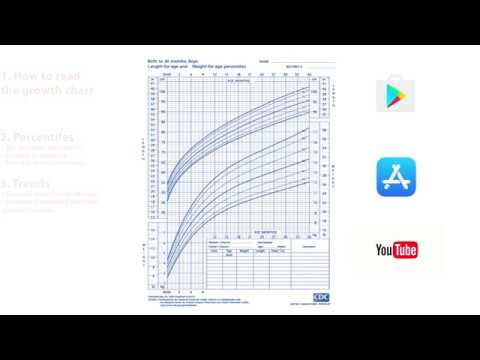
Those curved lines represent "channels." As long as your baby stays roughly within their channel, they are growing perfectly for them. We generally only investigate if a baby crosses two major percentile lines or if the curve flattens out entirely. Your baby milestone app is a visualization of this personal growth story, not a competition.
The 15-Minute Pediatrician Hack: Using Your Best Baby Tracker App
Pediatricians are notoriously busy. You usually get a tiny window to cover physical exams, vaccinations, and your own list of questions. This is where your data becomes a superpower.
The 'Executive Summary' Method
Don’t walk into the office and say, "I think she’s eating okay, but sometimes she seems fussy." That’s subjective and hard for a doctor to diagnose. Instead, use your app’s summary feature to provide the "Executive Summary."
Before the appointment, note these three averages:
- Total daily volume: Ounces or total nursing minutes.
- Frequency of wet diapers: To confirm hydration.
- Longest sleep stretch: And total sleep in 24 hours.
The Appointment Script: Talking to Your Doctor
When the doctor asks how things are going, use this script:
"Overall, things feel stable. Over the last week, she’s averaged 30 ounces of formula a day across 7 feedings. She’s consistently having 6 to 8 wet diapers. Her longest sleep stretch is now about 6 hours. I did notice a slight dip in her intake over the last three days—is that something we should keep an eye on?"

This instantly identifies you as a reliable historian. It allows the doctor to skip the basic troubleshooting and move straight to the expert analysis you're paying for. For more clinical advice on preparing for visits, visit HealthyChildren.org from the AAP.
Interpreting Patterns: Sleep and Feeding Architecture
Raw numbers often hide the reality of development. A baby might sleep 13 hours total, but if that sleep is broken into six 45-minute chunks, everyone is going to be exhausted. Understanding the "architecture" of these patterns is key to using a baby routine app effectively.
The 4-Month Shift: More Than Just a Regression
Around four months, a baby’s sleep architecture changes permanently. They move from simple newborn sleep to adult-like cycles including REM and deep sleep. This is why the "four-month regression" happens—they are literally learning how to process sleep differently.
When reviewing sleep logs in your baby sleep tracker, don’t just look at the total hours. Look at the consistency of the bedtime. The National Sleep Foundation notes that a consistent routine is often more vital for long-term sleep health than the sheer number of hours logged.
Avoiding the Data Trap: Managing Your Mental Health
There is a thin line between being informed and being obsessed. If you feel a surge of stress every time you open the app, it’s time for an "Exit Ramp."
The 'Zoom Out' Rule
Stop checking the daily totals every hour. Pick one day a week (like Sunday morning) to look at the week-over-week trends. If the graph is generally moving in the right direction, give yourself permission to ignore the small daily hiccups. You are a parent, not a 24-hour surveillance system. Monitoring CDC’s Developmental Milestones can help you focus on what your baby can do rather than just what they consume.
Exit Ramps: When to Hit 'Delete' on a Log
Tracking shouldn't be a life sentence. Here are some expert-approved times to stop:
- Diaper Logs: Once birth weight is regained and growth is steady (usually week 4).
- Feeding Duration: Once nursing is well-established and baby is efficient (usually 2-3 months).
- Growth: After six months, focus on milestones rather than daily ounces unless directed by a doctor.
Frequently Asked Questions
What is the best baby tracking app for new parents?
The best baby tracking app is one that offers intuitive data entry for feedings, sleep, and diapers while providing clear visual trends. It should help you identify patterns rather than just storing raw numbers.
Is it necessary to track every feeding and diaper change?
In the first few weeks, yes. It helps ensure the baby is getting enough nutrition and staying hydrated. Once your pediatrician confirms steady growth, you can often scale back to tracking only what feels most helpful for your routine.
Can a baby tracking app help with sleep training?
Yes, a baby sleep tracker can help you identify your baby's natural wake windows and sleep cycles, making it easier to implement a consistent bedtime routine and improve overall sleep quality.
Conclusion: Data as a Tool for Joy, Not a Chore
The goal of tracking isn't to create a perfect chart. It’s to buy back your mental bandwidth. When you use the best baby tracking app correctly, you don't have to argue with your partner about when the baby last ate or wonder if they are growing correctly. Use the data to find the rhythm of your unique child and silence the "what-ifs" with the confidence of "I know." You’ve got the tools—now go enjoy the journey.