The 3:00 AM Brain Fog: Why a Baby Tracker App Saves Your Sanity
It is 3:14 AM. You are sitting on the edge of the glider, rocking a swaddled five-day-old infant with your baby tracker app open on your phone. Your eyes burn, your partner is sound asleep in the next room, and you genuinely cannot remember which side your baby nursed on—or if that last diaper change happened before or after the midnight wake-up.
Newborn sleep deprivation does strange things to the human memory. In those early postpartum weeks, your short-term recall evaporates under the weight of fragmented sleep and shifting hormones. This is precisely why millions of new parents reach for their phones to log every drop, nap, and soiled onesie.
Yet, somewhere between trying to survive day four and searching online forums at dawn, logging can transform from a helpful sanity-saver into a high-stakes chore. You find yourself stressing over whether a 22-minute nursing session should count as 20 or 25 minutes, or wondering why your baby napped for 38 minutes instead of an even 45.
Tracking should serve your peace of mind, not your anxiety. A modern baby tracker app exists to remove cognitive load, not add to it. When used mindfully, tracking gives you clear answers during pediatrician visits, coordinates handoffs between sleepy caregivers, and helps you spot emerging biological rhythms—all without turning your baby into a data spreadsheet.
The Core Three: What to Track in the First 100 Days (and Why It Matters)
In the first three months of life—often called the fourth trimester—your baby's physiology changes at lightning speed. Rather than logging dozens of micro-events, focus your energy on the three metrics that carry actual diagnostic and day-to-day value: diapers, feeding, and sleep patterns.
Diaper Logging: Hydration Milestones and Stool Transitions
Diaper output is your clearest window into newborn hydration and nutritional intake. Because you cannot peer into a breast to measure exact fluid volume, what goes into the diaper tells you whether baby is getting enough milk.
According to clinical guidelines from the American Academy of Pediatrics (AAP), healthy newborns follow a predictable elimination curve during their first week:
- Day 1: At least 1 wet diaper and 1 dark, tarry meconium stool.
- Day 2: At least 2 wet diapers and 1–2 transitional brown-green stools.
- Day 3: At least 3 wet diapers and 2–3 transitional yellowish stools.
- Day 4: At least 4 wet diapers and 3 yellow, seedy stools.
- Day 5 and beyond: A minimum of 6 heavy wet diapers and 3 to 4 mustard-yellow stools every 24 hours.
When using a baby tracking app, you only need to tap once to register a wet, dirty, or mixed diaper. You do not need to weigh diapers on a kitchen scale unless your pediatrician or lactation consultant has specifically directed you to perform weighed tests for medical concerns. Pay attention to color changes during the first seven days: the transition from black-green meconium to olive-green and finally to bright golden-yellow demonstrates that your baby's gut is processing colostrum and mature milk properly.
If you ever notice red brick-dust marks (uric acid crystals) after day four, or pale chalky stools, that is your cue to call your doctor. Having a timestamped log directly in your app allows you to tell the triage nurse exact dates and frequencies rather than guessing.
Feeding Tracker: Breastfeeding Timers, Nursing Sides, and Bottle Volumes
Feeding in the early weeks feels constant. Full-term newborns need to eat 8 to 12 times in a 24-hour window, which translates to feeding roughly every 2 to 3 hours, counted from the start of one feed to the start of the next.
If you are nursing, your app's feeding tracker should do two basic things: remember the starting side and log total duration. Breast milk composition shifts subtly throughout a feed, moving from thinner foremilk to fat-rich hindmilk. Alternating starting sides helps ensure both breasts are stimulated evenly, which directly supports milk supply regulation as outlined by La Leche League International.
Practical Tip: Do not agonize over pausing the timer every time your baby pauses to breathe. If baby latches at 2:00 PM and unlatches contentedly around 2:25 PM, log a 25-minute feed on the left breast. Close the app and go about your day.
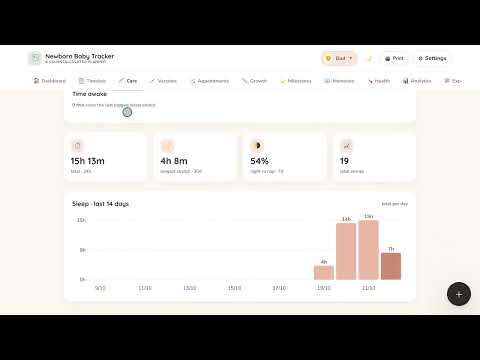
For bottle-feeding families—whether using pumped breast milk, infant formula, or a combination—volume matters far more than duration. Log the fluid ounces or milliliters offered and consumed. If baby takes 2 ounces out of a 3-ounce bottle, record 2 ounces. These records prove invaluable during the two-week well-child checkup when assessing whether your baby has regained their initial birth weight.
For mothers pumping milk, logging volume per session helps track pumping output trends over time. Seeing your baseline supply clearly prevents panic during temporary hormonal dips, such as during illness or the return of your menstrual cycle.
Sleep and Wake Windows: Recognizing Subtle Cues Without Rigid Schedules
Newborn sleep is famously disorganized. Infants are born without a functioning circadian rhythm; their bodies do not start producing predictable melatonin surges until around 8 to 12 weeks of age, a developmental timeline confirmed by The Sleep Foundation.
Attempting to enforce a strict schedule on a three-week-old is an exercise in futility. Instead, a baby sleep tracker helps you observe natural wake windows—the amount of time your baby can comfortably remain awake between naps before becoming overtired:
- 0 to 4 Weeks: 35 to 60 minutes of awake time.
- 4 to 8 Weeks: 60 to 75 minutes of awake time.
- 8 to 12 Weeks: 60 to 90 minutes of awake time.
- 3 to 4 Months: 75 to 120 minutes of awake time.
Wake windows include everything: feeding, burping, diaper changes, and brief eye contact. If your four-week-old has been awake for 55 minutes, glancing at your baby routine app reminds you that their yawns, glassy gaze, or clenched fists mean it is time to swaddle them and dim the lights. Catching sleepiness before an overtired crying spiral begins is one of the most immediate benefits of digital tracking.

Mindful Tracking: How to Avoid Data Overload and Postpartum Anxiety
Data should bring clarity, not panic. For some parents, logging every hiccup, sneeze, and five-minute catnap can trigger obsessive tendencies, transforming a helpful tool into a source of postpartum anxiety.
Research published by Postpartum Support International (PSI) highlights that high stress and perfectionism in early parenthood can exacerbate postpartum mood disorders. When parents feel they are failing if their log shows an irregular pattern, the tool is working against them.
Here is how to maintain a healthy relationship with your baby tracker app:
The Must-Track vs. Optional-to-Track Checklist
To keep tracking frictionless, categorize what you log based on immediate health necessity:
| Category | Must-Track (First 4-6 Weeks) | Optional / As Needed | Safe to Skip Entirely |
|---|---|---|---|
| Diapers | Wet count & dirty count (to monitor hydration & weight gain) | Stool consistency & exact color shades | Tracking the exact time of every individual wet diaper down to the minute |
| Feeding | Start time, total minutes, nursing side, or bottle ounces | Pumping volumes once supply is stable | Pausing timers for quick burps or short pauses during nursing |
| Sleep | Nap start and end times (to gauge wake windows) | Precise locations (bassinet vs. wrap vs. stroller) | Micro-wakes lasting under 3 minutes where baby self-settles |
| Health | Temperature during illness, medication dosages | Daily tummy time minutes | Logging every spit-up, hiccup, or bath duration |
Knowing When to Step Back and Taper Your Logging
Tracking is not a permanent commitment. Most pediatricians look for specific signs of health stability around the one-month to two-month mark:
- Your baby has steadily climbed back to and surpassed their birth weight, continuing along their established growth curve.
- You are getting at least 6 consistent wet diapers daily.
- You can intuitively identify when your baby is hungry or tired without checking a digital clock first.
Once these milestones are met, you have full permission to loosen the reins. Many families shift from logging every diaper to simply tracking naps and feeds. By four to six months, some parents stop daily logging altogether, reserving their newborn tracker for periods of illness, teething, medication schedules, or sleep regressions. Use the tool when it serves you, and pause it when your instincts are already giving you the answers you need.
Pediatrician Checkups Made Simple: The Data Doctors Actually Need
When you walk into the clinic for your infant's 3-day, 2-week, or 2-month checkup, the pediatrician will inevitably ask: "How is feeding going? How many wet diapers are you seeing daily? How is sleep?"
Without a log, tired parents often freeze, blurting out answers based purely on the previous 12 hours. A rough night makes it feel like baby never sleeps; an easy afternoon makes it feel like nursing is smooth sailing.
Clinicians do not need to sift through 14 pages of timestamped events. They want trends and weekly averages. Pediatric health metrics are evaluated against the World Health Organization (WHO) Child Growth Standards, which assess long-term percentiles for weight-for-age, length-for-age, and head circumference.
When using Baby Tracker App, you can open the summary screen and instantly show your pediatrician:
- Total 24-hour volume: Average daily ounces consumed or total daily nursing duration over the past 7 days.
- Daily elimination averages: Confirmed daily wet diapers ensuring adequate kidney perfusion and hydration.
- Percentile tracking: Visual curves plotting your baby's weight gain against international clinical baselines.
Being able to say, "She is averaging 26 ounces of breast milk across 7 feeds per day and producing 7 to 8 wet diapers every 24 hours" takes less than ten seconds. It gives your pediatrician the exact clinical data points they need to confirm healthy development while giving you instant peace of mind.
Partner Handoffs: Syncing Across Devices for Modern Caregivers
One of the most exhausting friction points for new parents is the constant verbal interrogation:
"When did he eat last?"
"Did you change his diaper before putting him down?"
"Was that last bottle formula or pumped milk?"
When one caregiver is waking up for a shift at 2:00 AM while the other collapses into bed, trying to remember and explain those details leads to miscommunication, forgotten doses, and unnecessary stress. Shift sleeping—where one parent covers 9:00 PM to 2:00 AM and the other takes 2:00 AM to 7:00 AM—is one of the most effective strategies for preserving adult REM sleep, but it requires real-time information handoffs.
A top-tier baby care app solves this with cloud synchronization across devices. If your partner gives a 3-ounce bottle at 1:15 AM and logs it on their phone, that data updates on your phone instantly. When you wake up for your shift, you simply open the app, glance at the dashboard, and see that baby was changed and fed 45 minutes ago. You let your partner sleep without whispering questions in the dark.
This cross-device coordination is equally valuable when grandparents, relatives, or daytime babysitters step in. Everyone stays on the same page regarding wake windows and feeding rhythms without needing sticky notes on the refrigerator.
What to Look for in the Best Baby Tracking App
There are dozens of baby logs on the market, ranging from clunky digital spreadsheets to ad-cluttered interfaces that require six taps just to record a wet diaper. When selecting an app to manage your newborn routine, prioritize features that make 3:00 AM use effortless:
1. One-Handed, Low-Friction Logging
You will frequently be holding a sleeping or nursing infant with one arm while trying to record an event with your free hand. If an app requires you to navigate complex menus, fill out compulsory text boxes, or dismiss pop-up advertisements, delete it. Look for large, intuitive buttons and single-tap confirmation for diapers and feeds.
2. Native Dark Mode
Bright blue light in a pitch-black nursery shocks your eyes and signals your baby's brain that it is daytime. An ideal baby tracker app includes a true dark mode interface, allowing you to check wake times and log feeds without turning the nursery into a floodlit stadium.
3. Multi-Caregiver Sync with Instant Updates
Confirm that the app allows multiple users to log into the same child profile across iOS and Android devices without requiring separate paid subscriptions or manual data exports.
4. Privacy and Data Security
Your child's biometric data, photos, feeding logs, and medical milestones are private. The Federal Trade Commission (FTC) regularly advises parents to review how mobile apps store, protect, and monetize personal data. Look for apps that provide enterprise-grade encryption, refuse to sell user data to third-party ad brokers, and allow you to export or delete your family's records at any time.
Baby Tracker App was built by parents who experienced these pain points firsthand. By prioritizing lightning-fast logging, distraction-free screens, shared caregiver profiles, and strict data security, it provides everything you need to support your baby without digital clutter.
Expanding Horizons: Milestone and Growth Tracking from 3 to 12 Months
As your baby graduates from the newborn phase into infancy, your tracking needs naturally evolve. The urgent daily questions about hydration and initial weight gain give way to developmental markers, movement milestones, and the transition to solid foods.
Motor Milestones and Tummy Time
Between months 3 and 6, tracking shifts toward motor development. The Centers for Disease Control and Prevention (CDC) Developmental Milestones provide clear age-based indicators for when babies typically begin rolling from tummy to back, pushing up on elbows, reaching for toys, and sitting without support.
Using an integrated baby milestone app feature allows you to log tummy time sessions in the early months, gradually building from 2 to 3 minutes several times a day up to 20 or 30 minutes of cumulative floor play. Recording when your baby first rolls over or transfers an object from one hand to another creates a treasured developmental timeline while keeping you informed for pediatrician visits.
Introducing Solids and Allergy Tracking
Around six months of age, most infants begin exploring purees and finger foods. Introducing common food allergens—such as peanuts, eggs, dairy, and soy—requires careful observation. A baby health tracker allows you to log specific ingredients introduced on specific days, making it simple to spot any correlation between a new food and skin reactions, digestive changes, or fussiness.
Frequently Asked Questions
What is the best baby tracker app for new parents?
The best baby tracker app is one that offers single-tap logging, multi-caregiver real-time sync, dark mode for nighttime feedings, and zero intrusive ads. Baby Tracker App provides these essential tools without overwhelming you with unnecessary menus or data entry fields.
How long should I track my newborn's diapers and feedings?
Most pediatricians recommend tracking diapers and feedings closely for the first 4 to 6 weeks until your infant has comfortably surpassed birth weight and established consistent daily elimination patterns (6+ wet diapers daily). After this period, many parents transition to tracking sleep and feeding rhythms as needed.
Can my partner and I sync data across different devices?
Yes. A modern baby tracking app supports real-time cloud synchronization across multiple iOS and Android devices, allowing parents, grandparents, and babysitters to update logs simultaneously during caregiver handoffs.
Does using a baby tracking app increase postpartum anxiety?
It can if you try to log every single minor event. To avoid data fatigue, focus strictly on the "Core Three"—wet diapers, feeding times/volumes, and sleep start/end times. Remember that the app is a helpful support tool, not a clinical scorecard.
Conclusion & Getting Started: Letting Tools Empower Your Instincts
No app, spreadsheet, or book can replace your intuition as a parent. You will quickly learn to recognize your baby's specific hunger cry, the way they rub their eyes when their wake window is closing, and the gentle sigh they make right before drifting into deep sleep.
A baby tracker app is simply a supportive flashlight in the fog of early parenthood. It remembers the details so your tired brain doesn't have to. It gives your partner the confidence to step in seamlessly, gives your pediatrician the clarity they need to monitor growth, and gives you back valuable mental bandwidth.
Start small. Download Baby Tracker App, log your baby's feedings and diapers for forty-eight hours, and notice how much mental weight lifts when you stop trying to keep every timestamp in your head. Use the data to build confidence in your caregiving, trust your instincts, and take the fourth trimester one calm, well-supported step at a time.